
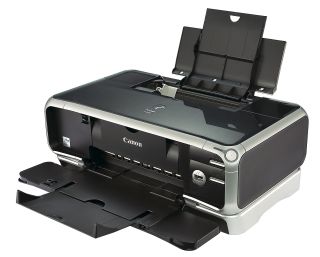
The Canon iP8500 manual is a valuable resource for learning about all the features and functions of your photo printer. It can help you troubleshoot problems, customize settings, and optimize its performance. Please read and save the entire manual before setting up or using your Canon Pixma iP8500. Misuse may damage the unit or cause harm or serious injury.
PDF manuals
Canon Pixma iP8500 User Manual (6.5 MB pdf file)
Canon Pixma iP8500 Easy Setup (3.1 MB pdf file)
Canon Pixma iP8500 Features
The Canon PIXMA iP8500 is a dedicated photo printer – featuring Canon’s exclusive 8-ink ChromaPLUS photosystem – that puts unprecedented color, image quality, and speed in the hands of photographic professionals. All the other great Pixma features are included, too. So, for your money, you have a top-of-the-range photo printer and the built-in convenience of two paper trays, duplexing, and CD printing.
- Sharp 4,800 x 2,400 dpi maximum resolution
- Up to 16 ppm black, 12 ppm color; built-in 2-sided printing
- Borderless 4-by-6-inch photo in just 23 seconds
- Directly supports PictBridge-compatible digital cameras and DV camcorders
- PC and Mac compatible; 1-year warranty with toll-free phone support
Canon Pixma iP8500 Specifications
| Canon Pixma iP8500 | Specs |
|---|---|
| Printing resolution | 4800 x 2400 dpi. max. |
| Print speed | Black printing (text pattern) Max Speed (Custom Setting 5): 17 ppm Standard: 5.3 ppm; Color printing Max Speed (Custom Setting 5): 15 ppm Standard: 4.6 ppm; Photo printing (PR-101 A4) Standard: 1.39 ppm |
| Print width | 203.2 mm max. (8.0 inches) (for Borderless Printing: 215.9 mm / 8.5 inches) |
| Resident print control mode | Canon extended mode |
| Receive buffer | 80 KB |
| Interface (USB) | USB interface / USB 2.0 Hi-Speed interface |
| Acoustic noise level | Approx. 36 dB (A) (in the highest print quality mode) |
| Operating environment | Temperature: 5 to 35?C (41 to 95?F); Humidity: 10 to 90%RH (no condensation) |
| Storage environment | Temperature: 0 to 40?C (32 to 104?F); Humidity: 5 to 95% RH (no condensation) |
| Power supply | AC 110-120 V, 50/60 Hz and/or AC 220-240 V, 50/60 Hz |
| Power consumption | Print standby: Approx. 1 W; Printing: Approx. 23 W |
| Dimensions | 453 (W) x 293 (D) x 170 (H) mm |
| Weight | 7.3 kg (16.09 lb.) |
| We also have Canon PIXMA printer manuals for: |
|---|
| Canon G1220 |
| Canon G2470 |
| Canon G3260 |
| Canon G3470 |
| Canon G3570 |
| Canon G6020 |
| Canon TR4720 |
| Canon TS3322 |
| Canon TS3355 |
| Canon TS3522 |
| Canon TS6420 |
| Canon MX922 |
| Canon iP8500 |
What are the different series of Canon printers?
- PIXMA: Consumer-level printers for personal and home use, also includes photo printers
- PIXMA G-Series: Refillable ink tank (MegaTank) printers
- PIXMA PRO: Professional inkjet printers
- SELPHY/IVY: Compact photo printers
- MAXIFY: High-yield inkjet printers for small offices
- imageCLASS: Laser printers for home or small offices